Nowstamp
Day counter camera: Nowstamp
Nowstamp (날짜도장 in Korean) is an iPhone camera app that stamps the date and time on a photo the moment you take it, together with a day counter. Set a target date and the stamp reads “Exam D-12”; set a start date and it reads “Day 37”. On the target date it reads D-DAY, and D+ after that. There are no ads, no subscription, no account, and no app logo on your photos.
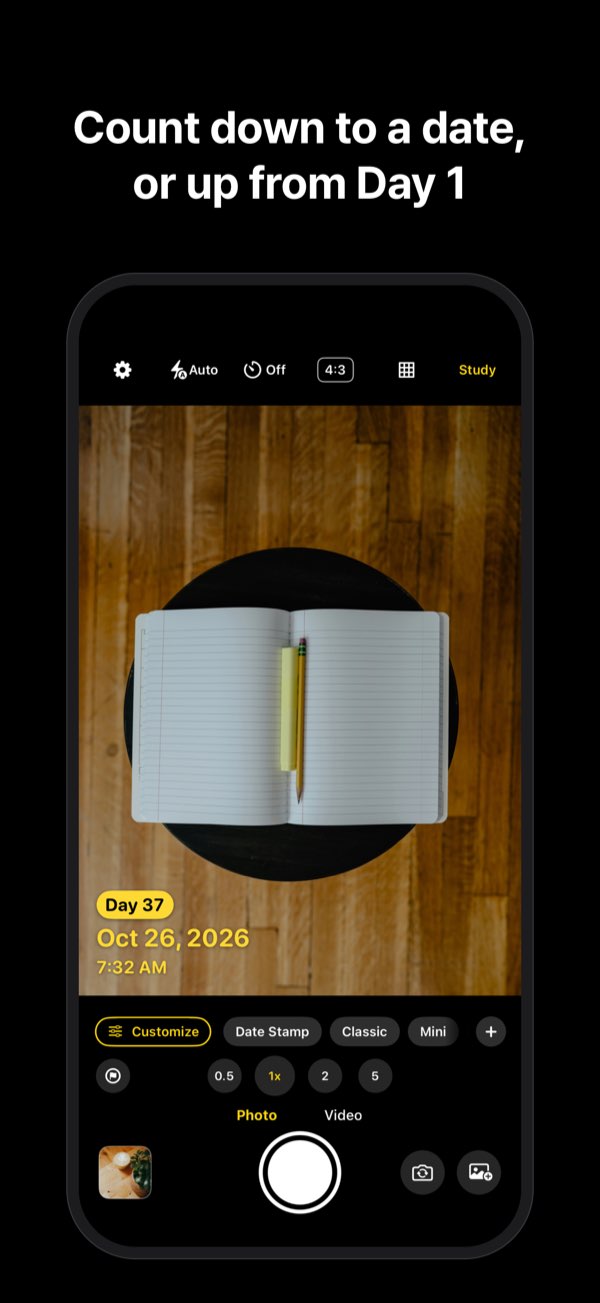
Three steps
- Turn on Day Counter. On the camera screen, tap the stamp or the Customize button to open the stamp editor. In the Day Counter tab, choose D-day or Day N.
- Date and title. For D-day choose the target date; for Day N choose the start date. Add a title such as “Exam” or “Diet”. The start date is Day 1, and nothing is stamped before the start date. Tap Save Stamp to switch stamps in one tap on the camera screen.
- Shoot. Press the shutter and the photo carries that day’s count along with the date and time. The count updates every day on its own.
Good to know
- The counter uses today’s date on your iPhone, and the date and time come from your iPhone’s clock. You can’t enter a time in Nowstamp.
- Keep several counters (one for an exam, one for training) by saving each as its own entry in My Stamps.
- Older photos work too. Import Photo uses the date saved in the photo to compute the count.
What this app doesn’t do
- There’s no way to enter the stamp’s time. The camera uses your iPhone’s clock at the moment you shoot, and imported photos use the time saved in each photo.
- No widgets or reminders. The count appears only as a stamp on the photo.
- It doesn’t record video. It’s for photos only.
- There are no ads, no subscription, and no account. The app has no server and sends no data to the developer or any third party.
- No addresses or maps. The location stamp holds only a place name you type and GPS coordinates your iPhone measures, both off by default.
- There’s no Android version. It’s an iPhone app.
Get it