Nowstamp
Move-in photos with date and time: Nowstamp
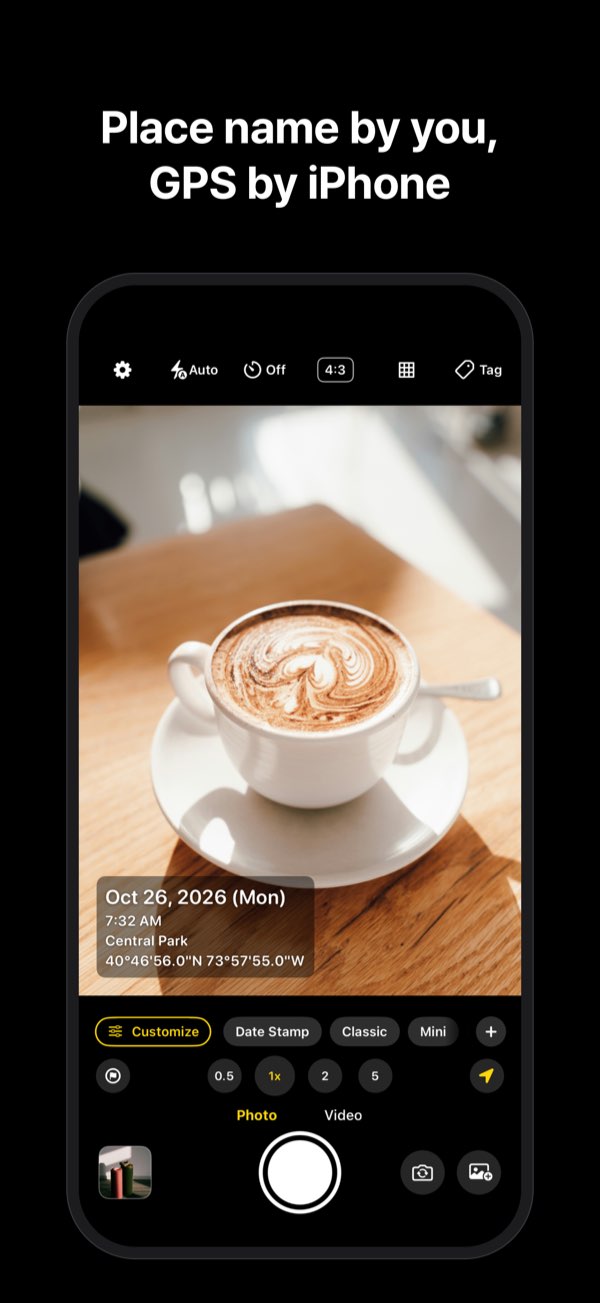
Nowstamp (날짜도장 in Korean) is an iPhone camera app that stamps the date and time on a photo the moment you take it. Shoot the walls, floors, windows, and appliances on move-in day and again on move-out day, and every photo carries that day’s date and time. There are no ads, no subscription, no account, and no app logo on your photos. The app has no server and sends no data to the developer or any third party; photos are saved to your iPhone’s photo library.
Three steps
- Pick a stamp. On the camera screen, tap the stamp or the Customize button to open the stamp editor. In the Format tab choose how the date and time are written (seconds are available), and in the Style tab choose a style that reads well on walls (Box works on bright surfaces). Tap Save Stamp to reuse it.
- Location (optional). In the Location tab, type a place name (for example “Unit 302, living room”) and, if you want, turn on GPS Coordinates. Coordinates are measured by your iPhone just before the shot and have a margin of error. To also store coordinates in the photo’s info (EXIF), turn on Settings > Location > Save GPS Coordinates in Photo Info. Both are off by default.
- Shoot. Take a wide shot of each room and close-ups of any damage. Turn on Also Save Original Photo in Settings if you want the unstamped original too. To send photos to a landlord or agent, you can share them from the Photos app, but send any photo you want checked by its capture record as described under Good to know below.
Good to know
- The date and time come from your iPhone’s clock, and the capture time in the photo’s EXIF data matches the stamp. You can’t enter a time in Nowstamp. The stamp is only as right as your iPhone’s clock, and the app can’t tell if the clock was changed.
- The place name is text you typed; the app doesn’t check it. Coordinates are never turned into an address.
- A photo’s coordinates go with it when you share it or sync it with iCloud Photos. If you don’t want your home’s coordinates in a photo, leave GPS Coordinates off.
- The optional capture record (off by default) lets this app check whether a photo has changed since it was taken. It goes only into the stamped photo, not into the unstamped original from Also Save Original Photo. To have a photo checked, use this app’s Share button, or share from the Photos app with All Photos Data turned on under Options. Either way, send it by a method that keeps the file unchanged, such as AirDrop. A photo sent this way also carries any GPS coordinates saved in its photo info (“Save GPS Coordinates in Photo Info”, off by default). Photos shared from the Photos app without All Photos Data, or through most messaging apps, can’t be checked, and the person checking needs this app too. Details are on the Capture Record page.
What this app doesn’t do
- No addresses or maps. The location stamp holds only a place name you type and GPS coordinates your iPhone measures, and the app never turns coordinates into an address or shows them on a map.
- It doesn’t store your photos or build reports. Photos live in your iPhone’s photo library, and the app sends no data to the developer or any third party.
- There’s no way to enter the stamp’s time. The camera uses your iPhone’s clock at the moment you shoot, and imported photos use the time saved in each photo.
- It doesn’t record video. It’s for photos only.
- There are no ads, no subscription, and no account.
- There’s no Android version. It’s an iPhone app.
Get it